
There is a security feature in Chromium 142 and higher to restrict the ability to make requests to a user’s local network, gated behind a permission prompt. This permission prompt will appear when a website:
- Uses WebRTC
- Tries to detect local IP addresses
- Attempts to communicate with devices on
192.168.x.x,10.x.x.x, etc. - Uses network discovery features (like smart device setup pages)
Unfortunately, this security feature will block DataStack and other Omnivex Ink components from displaying Apps on displays using these newer versions of Chromium.
The Local Network Access permission in Google Chrome 142+ is a user-controlled browser permission. This prevents malicious sites from scanning your local network (e.g., probing 192.168.1.1).
In order to allow Ink to display Apps on devices with Chromium 142+, the user will need to unblock this feature. This will also be the case if you are running DataStack.
Chromium versions 142+ will present the user with a popup:
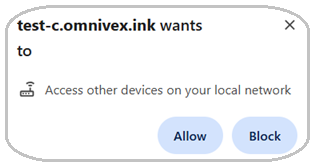
If you choose Block, you will receive a CORS error when Omnivex Ink attempts to connect. You can Allow Ink to access other devices on your local network which will prevent the CORS error from appearing.
Allowing access once blocked:
In order to Allow access if you have previously Blocked access, you can access/modify the setting using the following steps:
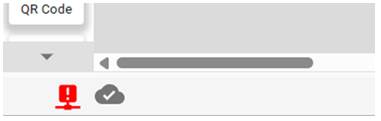
- If Blocked, you will notice the DataStack Connector indicator in the lower left corner of the App builder will be red:
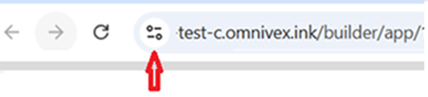
- Click on the icon at the left edge of the address bar of your browser (or DataStack computer):
- Toggle on the Local network button:
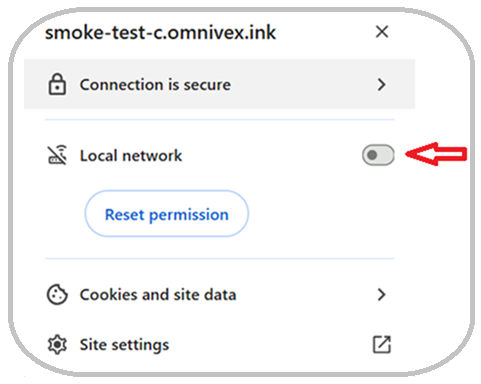
- Click Reload:

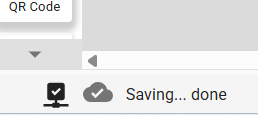
- You will notice the DataStack connected indicator will turn black:
Alternatively, you can go to: chrome://settings/content/localNetwork and manage Allow / Block sites by entering your Ink FQDN: <organization>.omnivex.ink or <organization>.omnivex-ca.ink depending on the Ink environment in your FQDN.
More information on the Chrome security feature can be found here: https://chromestatus.com/feature/5152728072060928